Setting or Changing a Block Placed on a Number
When a new number is added manually to the Global Numbers library, the Block Type field on the Number Detail Record defaults to Not Blocked.

By clicking anywhere in the Block Type field, you can display a dropdown list of all block types. You can block a new or existing number from being called by inmates by selecting Facility from the Block Type dropdown list.
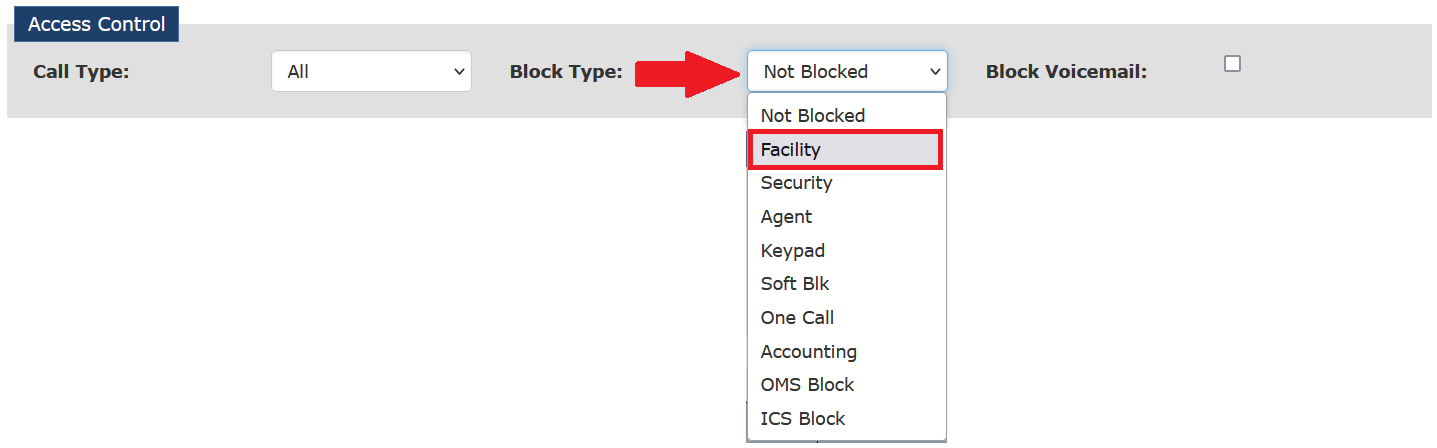
When you select Facility, you must enter a note describing why you are blocking the number. After you click Save Changes, a Create Note dialog box is displayed, and you must enter text and save the note. If you do not enter a note, The ENFORCER® displays an error message and will not allow you to save the block change.
After you select a block type, it is displayed in the Block Type field, as shown in the following example.

If any selection other than Not Blocked is displayed in the Block Type dropdown list, the number has been blocked already, either automatically by The ENFORCER® or manually by a user action. The options in the Block Type dropdown list describe why the block has been set on the called party number, as described in the following table.
Table: Block Number Dropdown List Options
| Block Type | Action that Caused the Block |
|---|---|
| Not Blocked* | The number is not blocked, and the inmate can call the number. This default is applied to a new, manually created number and remains as such unless changed by a called party block or manually by an ENFORCER® user. |
| Facility* | A Block is placed on the number by a user at the correctional facility. You can use the Facility option to block calls to a Privileged number during certain hours of the day. To allow calls to a number that a previous action has blocked, set the Block Type option to Not Blocked. |
| Security | A Block is placed on a number after an ENFORCER® user clicks the Cut Off button while monitoring an inmate call through The Observer℠ live call monitoring module. |
| Agent | A Block placed on a number by an ICS Customer Service Agent due to account delinquency or misuse by the called party. |
| Keypad | A Block placed on a number by the called party, who entered a keypad digit to block calls from the calling inmate or to block calls from the entire facility. |
| Soft Block | Not used. |
| One Call | At the facility's request, the number was set up to allow only one call per inmate, and a block was placed automatically by The ENFORCER® after the one call was placed to the number by the inmate. |
| Accounting | A Block placed on the number by a user with permission to access pages under The ENFORCER® Accounts tab. |
| OMS Block | A Block placed on a number from the facility’s Offender Management System (OMS) or Jail Management System (JMS) |
| ICS Block | A Blockwas placed on a number by ICSolutions® when The ENFORCER® was installed initially in place of a different inmate phone management system from another vendor, and the number was blocked by the previous vendor. |
| Block Voicemail | When this option is selected, the calling party will be blocked from leaving a voice message for an inmate. An ENFORCER® user may take this action to suspend an outside caller temporarily due to inappropriate use of the Leave Voice Mail for Inmate function. |
* These are the only options that you should use to set or change an existing block on the number in a Number Detail Record.