Setting an Outdialed Informant Call as Do Not Record
Using The Informer℠ Admin function, a called party number such as an abuse reporting hotline or law enforcement agency can be set up so that an inmate can call it anonymously without entering their PIN in The ENFORCER®. In The Informer℠ Admin function, these calls are defined under a category called OUTDIAL calls. By default, these calls are recorded by The ENFORCER® IVR. If you do not want inmate calls to a selected OUTDIAL category to be recorded, you must configure the called party number by using the following procedure set.
How to Set an OUTDIAL Informant Number as Do Not Record
- Select Global Numbers under the Global Numbers tab.
- Enter the 10-digit phone number in the main search field.
- Click Search. The Number Detail Record for the number is displayed, with the phone number in the Number field.
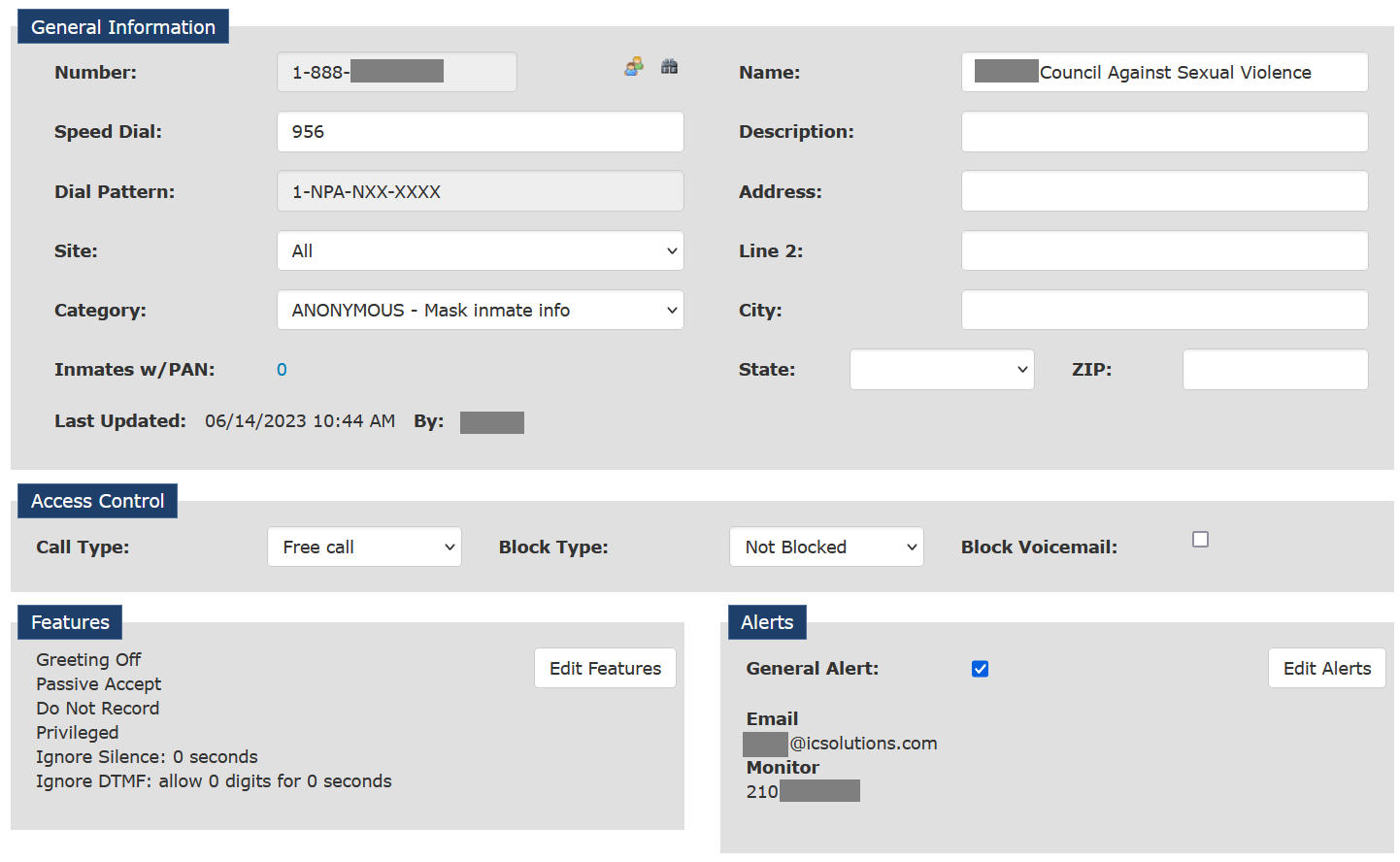
- In the Speed Dial field, enter the same bypass code defined on The Informer℠ Admin page for the number.
- In the Name field, enter the name you want to associate with the called party that is accepting the calls.
- If you want the identity of the inmate to remain anonymous even if the number is called by the inmate from a source in The ENFORCER® IVR other than The Informer℠ IVR, select ANONYMOUS in the Category dropdown list.
- If you do not want the inmate's identity to remain anonymous, select CALLPARTY from the Category dropdown list.
- Click Edit Features, then select the Do Not Record checkbox.
- Create and save a Note in the Number Detail Record. This step is required to save your changes.
- Click Save at the top of the page.
The following example shows a Number Detail Record that includes meaningful information for an informant outdial number set up on The Informer℠ Admin page. This record was created to prevent the recording of inmate calls placed to the number and was set to keep the inmate’s identity anonymous if the number is called outside of The Informer℠ IVR. Additionally, the Call Type was set to Free call.