Specifying a Maximum Size for Email Attachments
An email server may sometimes limit the maximum file size for an email attachment. When this condition occurs, you can specify a maximum file size for an email attachment. When a maximum is selected, The ENFORCER® will automatically send any attachments that exceed this maximum size in one or more separate email messages.
For example, if the maximum file size is set at 5 MB and the number of recordings to be attached requires 8MB, then The ENFORCER® will automatically prepare and send multiple messages. The ENFORCER® will split the recording files into as many separate emails and attachments as are needed to transmit all selected recordings to the specified recipient.
How to set a maximum attachment size for emailed call recordings
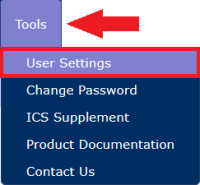
- Click User Settings under the Tools tab.
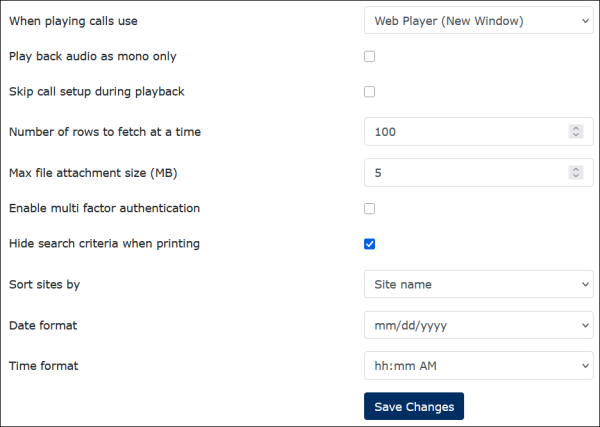
The following is displayed.
- Using the dropdown arrow in the field, select the maximum file size in MB for call recordings to be attached to an email message.
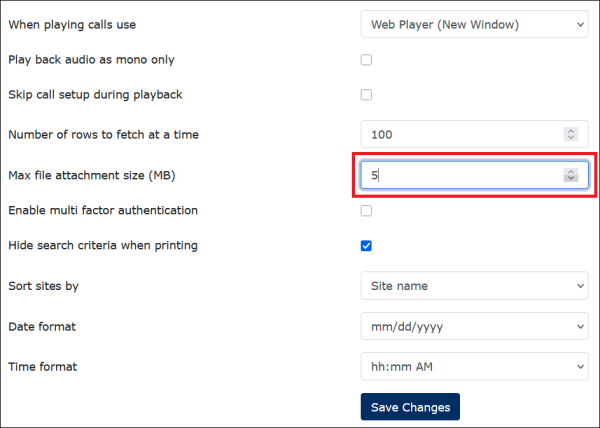
The maximum file attachment size you can specify is 20 MB.
- Click Save Changes.
The maximum file size you specify will populate as the default when you click Email from the Call Records search results page.