Prepaid Collect Accounts
Prepaid Collect Accounts are the account type that is established by using ICSolutions® Point-of-Sale Prepaid Collect℠ product. This account type enables any called party to set up a pre-funded account for a called party phone number. This type of account is ideal for enabling collect calls to a number that would otherwise be blocked, such as a cell phone number or a phone customer with credit problems or billing arrangement issues. A Prepaid Collect Account enables one or more payers to deposit prepaid funds into the account.
Prepaid Collect Accounts are created through a direct phone conversation between the customer (called party) and the ICSolutions® Customer Service Center (1-888-506-8407). Funds can be deposited into a Prepaid Collect Account through several available payment methods, including online, by phone, or through a live customer service agent.
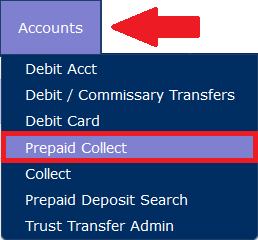
To access Prepaid Collect Accounts, select Prepaid Collect under the Accounts tab.
To locate a Prepaid Collect Account, enter the 10-digit phone number associated with the account and click Search.

The system then displays the Prepaid Collect page for the phone number.
You do not need to type the number 1 in front of the 10-digit number. After you click Search, the number 1 will automatically be displayed in front of the number.
If you do not know the exact phone number associated with the account, you may enter the number 1 and the area code followed by an asterisk (*), as shown in the following example. Select a phone number from the list.
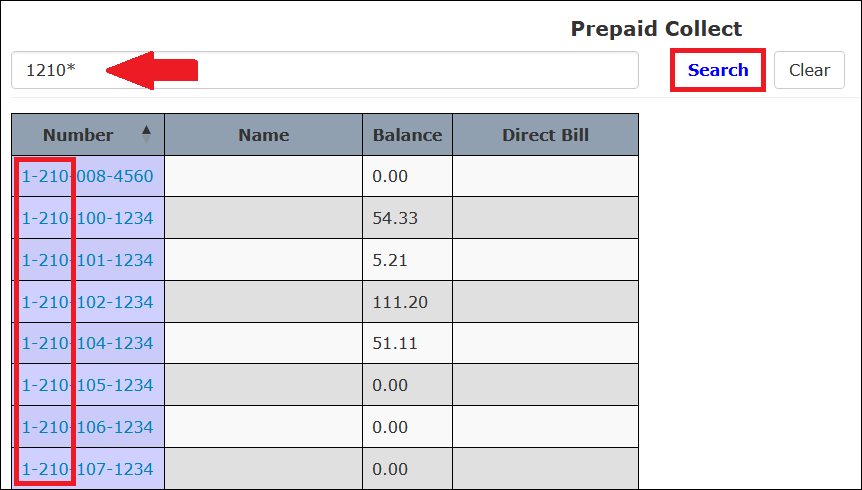
You can then select the desired account holder from the displayed list by clicking the phone number associated with the account holder.
If you know the account holder’s last name but do not know the phone number associated with the account, begin entering the account holder’s last name and click Search.
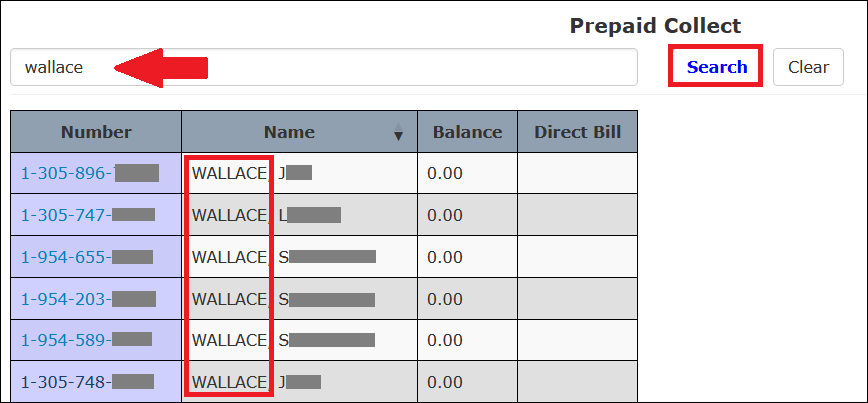
You can then select the desired account holder from the displayed list by clicking the phone number associated with the account holder.
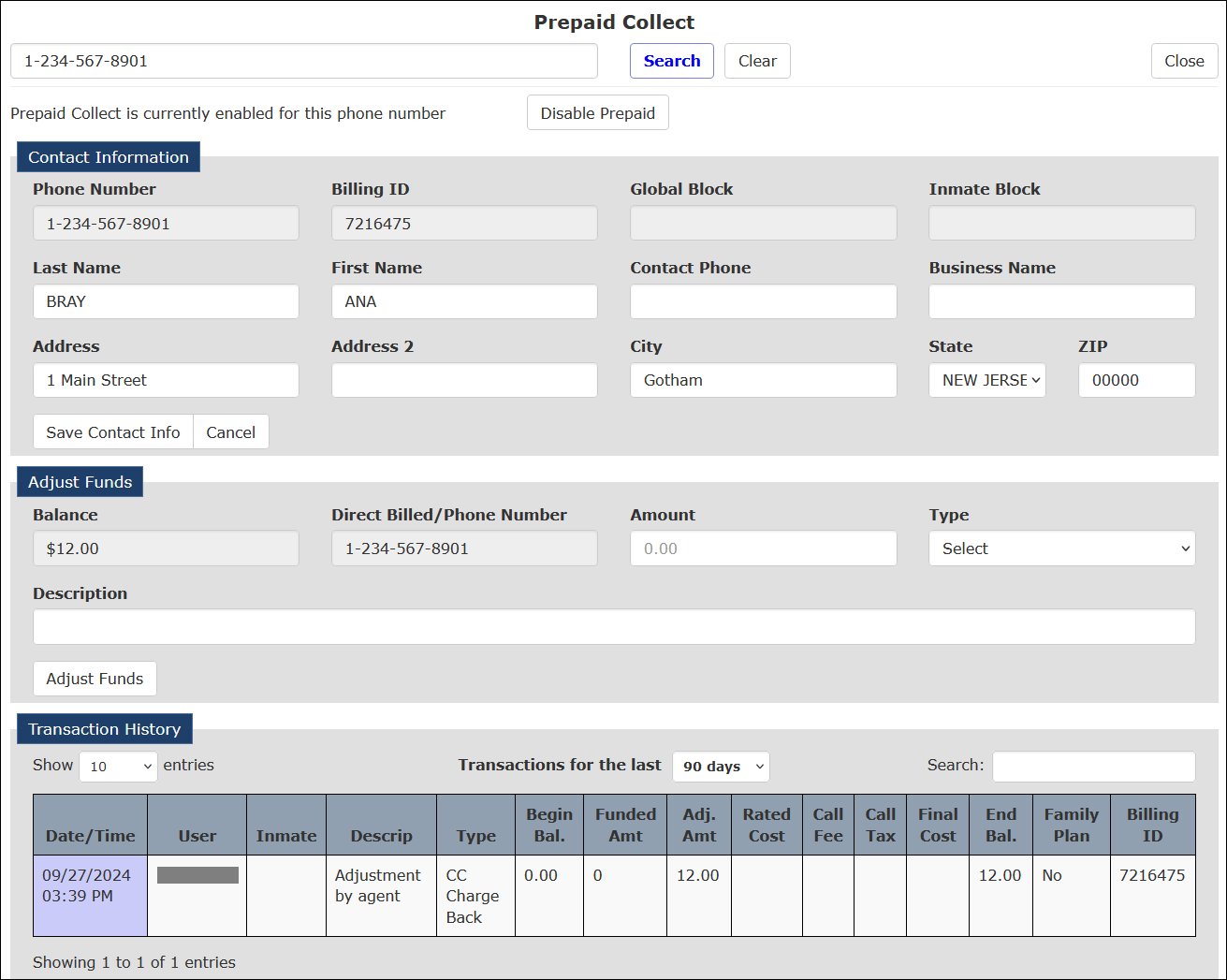
After you access an existing Prepaid Collect account, The ENFORCER® displays the Prepaid Collect account page as shown in the following example.
Adjusting a Prepaid Collect Account Balance
Although Prepaid Collect accounts are funded directly by the account holder, manual adjustments can be made to a Prepaid Collect account. These adjustments are described in the following table.
| Type | Definition | Usage |
|---|---|---|
| Account Refund/Credit | Subtract funds for refund directly to account holder. | Subtract funds |
| CC Chargeback | Any adjustments related to credit card disputes. | Add or subtract funds |
| Funds Transfer | Funds transferred to/from another account. For example, property or trust accounts. | Add or subtract funds |
| Telco Credit | Adjustments made to credit any call/audio issues. | Add funds |
| Video Visitation Call | Any charges or credits related to video visitation. | Add or subtract funds |
How to locate a Prepaid Collect account and make an account adjustment
- Enter the 10-digit phone number in the Prepaid Phone Number field. Click Search.
- If you do not know the exact phone number associated with the account but do know the area code of the phone number, enter the number 1 and the area code followed by an asterisk (*), then click Search. Select the desired phone number from the displayed list.
- If you know the account holder’s last name but do not know the phone number associated with the account, begin entering the account holder’s last name and click Search. Select the desired account holder from the displayed list.
- In the Adjust Funds pane, enter the dollar amount of the adjustment in the Amount field. If the adjustment is intended to take funds out of the account, be sure to include a minus sign (–) in front of the entered dollar amount.
- Select an account adjustment type from the Type dropdown list.
- In the Description field, enter a description to provide additional detail on the adjustment being made.
- Click Adjust Funds.
Viewing Call Records
From the Transaction History, you can access the call records for a specific call made against the Prepaid Collect Account. You can also access a complete list of call records for all calls made by the inmate against the account. All call records display Prepaid Collect in the Call Type column.
Viewing call records for a Prepaid Collect Account is performed in the same manner as for an Inmate Debit Account. For information about viewing Call Records from a Debit Account, click here.
Converting a Prepaid Collect Account to a Collect Account
Occasionally, a Prepaid Collect account holder may request that an account be converted to a Collect account. For example, the account holder may have been able to resolve a billing issue that previously prohibited the setup of a collect account for the billing number.
Converting an account from Prepaid Collect to Collect should be done only at the account holder’s request.
How to convert a Prepaid Collect account to a standard Collect account
- Enter the 10-digit phone number in the search field. Click Search.
If you do not know the exact phone number associated with the account but do know its area code, enter the number 1 and the area code followed by an asterisk (*), and click Search. Select the desired phone number from the displayed list.
- If you know the account holder’s last name but do not know the phone number associated with the account, begin entering the account holder’s last name and click Search. Select the desired account holder from the displayed list.
- At the top of the Prepaid Collect account page, click Disable Prepaid.

- The page changes to indicate the account has been converted to a standard Collect account.

- To access the newly converted Collect account, click Go To Collect.

The Collect account page is displayed and lists the default calling thresholds. For more information on viewing and editing Collect accounts, click here.