Table of Contents
Working with Search Results
The results of a Global Numbers search are displayed in a table that lists each stored phone number based on the search results. The displayed columns contain key information about the phone number.
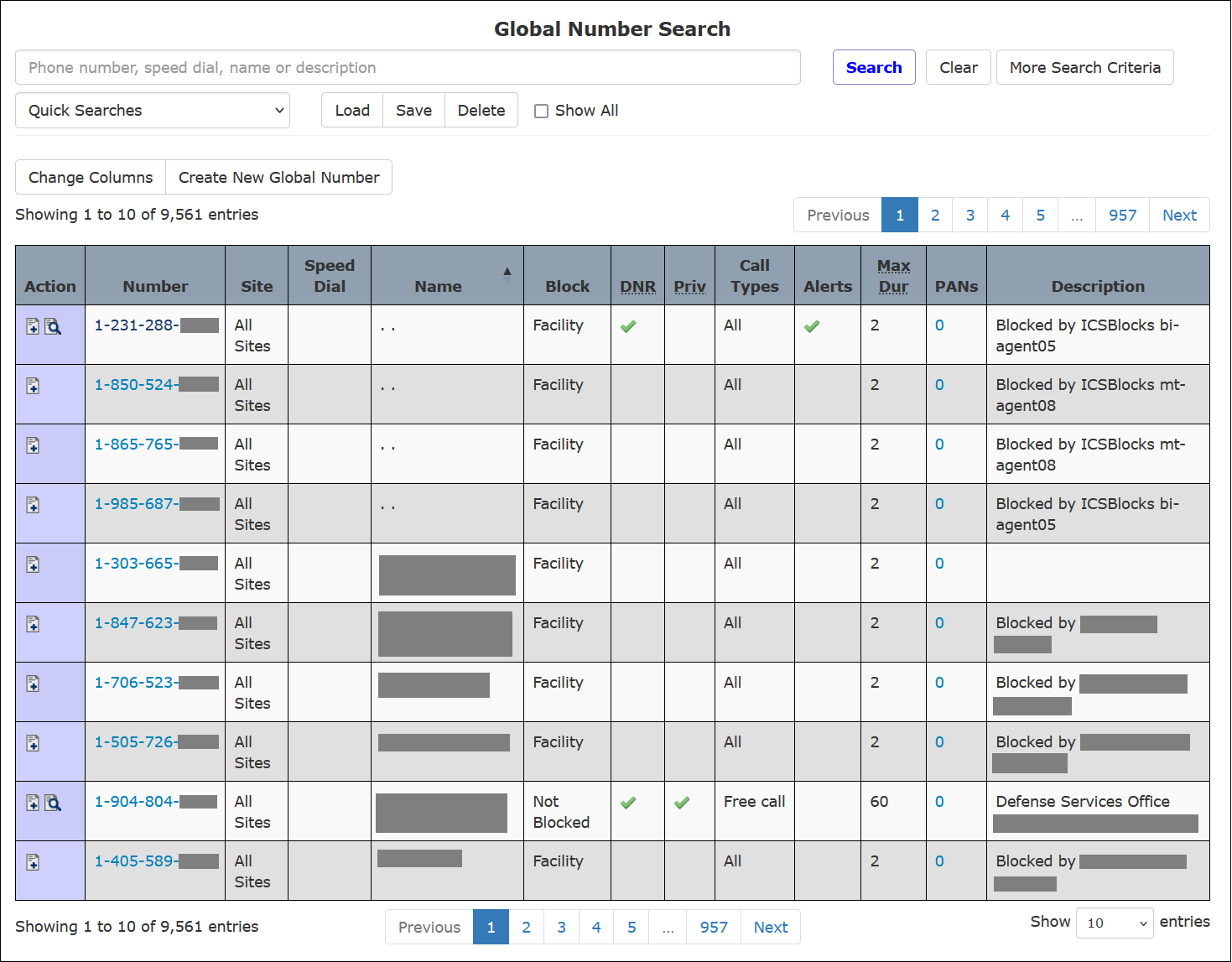
Using Search Results
When you hover your mouse over any line item, the line is highlighted. You can click anywhere on the line item to access the Number Detail Record for the number.
A blue number in the PANs column indicates that the called party number has been defined in one or more Inmate PAN lists. When you click this number on a line item, The ENFORCER® displays the Number Detail page, which lists the PAN entries for the phone number.
Changing Columns in the Search Results
Before or after submitting a search, you can click Change Columns to display a dialog box that enables you to add or remove columns of information on the search results.
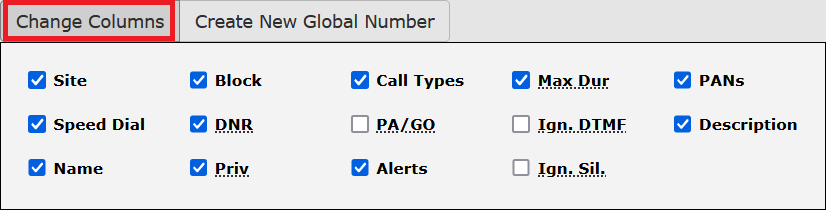
When you open the dialog box, a default set of checkboxes is pre-selected based on the most frequently used Global Numbers information. After you add or delete columns by selecting or deselecting them, the search results immediately display the revised column headings.
In the Change Columns dialog box, columns are listed from top to bottom in the same order displayed on the search results from left to right.
The following table describes the columns and icons displayed on a Global Numbers search results. Some columns may be selected or deselected by clicking Change Columns.
Table: Global Number Results Columns and Icon Descriptions
| Column Name/Icon | Description |
|---|---|
Action   | Contains icons associated with notes for the phone number. Click to add a note to a Number Detail Record. Click to view existing notes for the Number Detail Record. |
| Number | The phone number associated with the Number Detail Record. |
| Site | The site is assigned to the phone number. If a specific site is displayed in this column, only inmates located at that site can call the phone number. |
| Speed Dial | Speed dial entry that is set up for the phone number. |
| Name | The name of the calling party or the name of the entity, such as County Sexual Abuse Reporting Hotline. |
| Block | Type of block currently set for the phone number, if any. |
| DNR | Do Not Record. If this option is set for the number,  is displayed in this column. is displayed in this column. |
| Priv | Privileged. This setting allows all inmates to call the phone number regardless of any other restriction on the number. If this option is set for the number, is displayed in this column. |
| Call Types | This column displays one or more allowed call types to the phone number. If Free Call is specified, inmates can place free calls to the number. If All is specified, no restrictions are placed on inmate calls and inmates can make any type of call to the number. |
| PA/GO | Passive Accept/Greeting Off. This column indicates whether either or both of these options have been set for the phone number. |
| Alerts | The number of alerts that were flagged on a phone number. |
| Max Dur | Max duration minutes. Indicates the maximum number of minutes an inmate can be connected to the phone number for a single call. |
| PANs | Personally Allowed Numbers. If one or more PAN entries are defined for the number, you can click the number to access the Number Detail Record for the number. |