Table of Contents
User Security
Access to ENFORCER® functions is controlled for each specified user through a customized combination of Roles and Access Codes. Each user who is set up to access The ENFORCER® user interface is assigned Roles and Access Codes by the facility’s Site Administrator. The Site Administrator is the only resource who can add or set up a user.
ENFORCER® Roles
A role is a generic job description for an ENFORCER® user. For example, a person who performs certain tasks for a correctional facility, for a law enforcement agency, or for an ICSolutions® business partner. When a new user is initially set up to use ENFORCER®, the Site Administrator can assign the user permission to perform a defined group of tasks. This group is assigned a meaningful role name. A few examples are as follows:
- Unordered List Item Booking for a jail booking officer.
- Unordered List Item Site User for ENFORCER® administrative personnel at a site.
- Unordered List Item Investigator for a law enforcement investigator who uses The ENFORCER® only to receive alerts or monitor phone calls.
To simplify the setup of a new user in The ENFORCER®, every new user is assigned a role name. This enables The ENFORCER® Site Administrator to quickly assign a set of tasks to multiple users who perform those tasks.
The ENFORCER® Site Administrator can perform the following tasks:
- Assign one or more roles to a user.
- Change the tasks currently assigned to a role.
- Define a new role, and assign a group of tasks to it.
- Delete a role.
A Possible list of roles that may be defined for an ENFORCER® facility can include the role names shown in the following table.
ENFORCER® Role Name Examples
| Role Names | ||
|---|---|---|
| Site Administrator | Investigator | Records Administrator |
| Site User | Booking | Phone Administrator |
| Call Records Share | Call Monitor | Billing |
| Internal Affairs | Prepaid Collect Accounts Administrator | Customer Service |
| Security Specialist | Accounting | PAN Entry |
ENFORCER® Access Codes
Because of its diverse functionality, The ENFORCER® system utilizes a matrix of access codes, each of which grants specific task-related user rights to the role. This matrix is called the Role / Access Definitions matrix. These rights may include any of the following:
- View-only access to certain information.
- Capability to change Inmate Detail page information.
- Capability to view or make adjustments to inmate calling accounts.
- Access to call records, alerts, and recordings.
- Capability to view or edit Number Detail Records stored in the Global Numbers library.
- Capability to perform certain tasks, such as copying call records to a CD.
- Capability to generate selected ENFORCER® reports.
- Access to optional ENFORCER® interfaces or tools.
After assigning a user to a role, The ENFORCER® Site Administrator enables specific access codes. Available access codes associated with roles in The ENFORCER® are described in Chapter 10: Site Administration of the ENFORCER® User Reference.
Site Administration documentation will be coming soon to this wiki!
The following example shows a portion of the Role / Access Definitions matrix. This example shows that an agency can request and have additional roles created for a specialized task such as conducting inmate investigations.
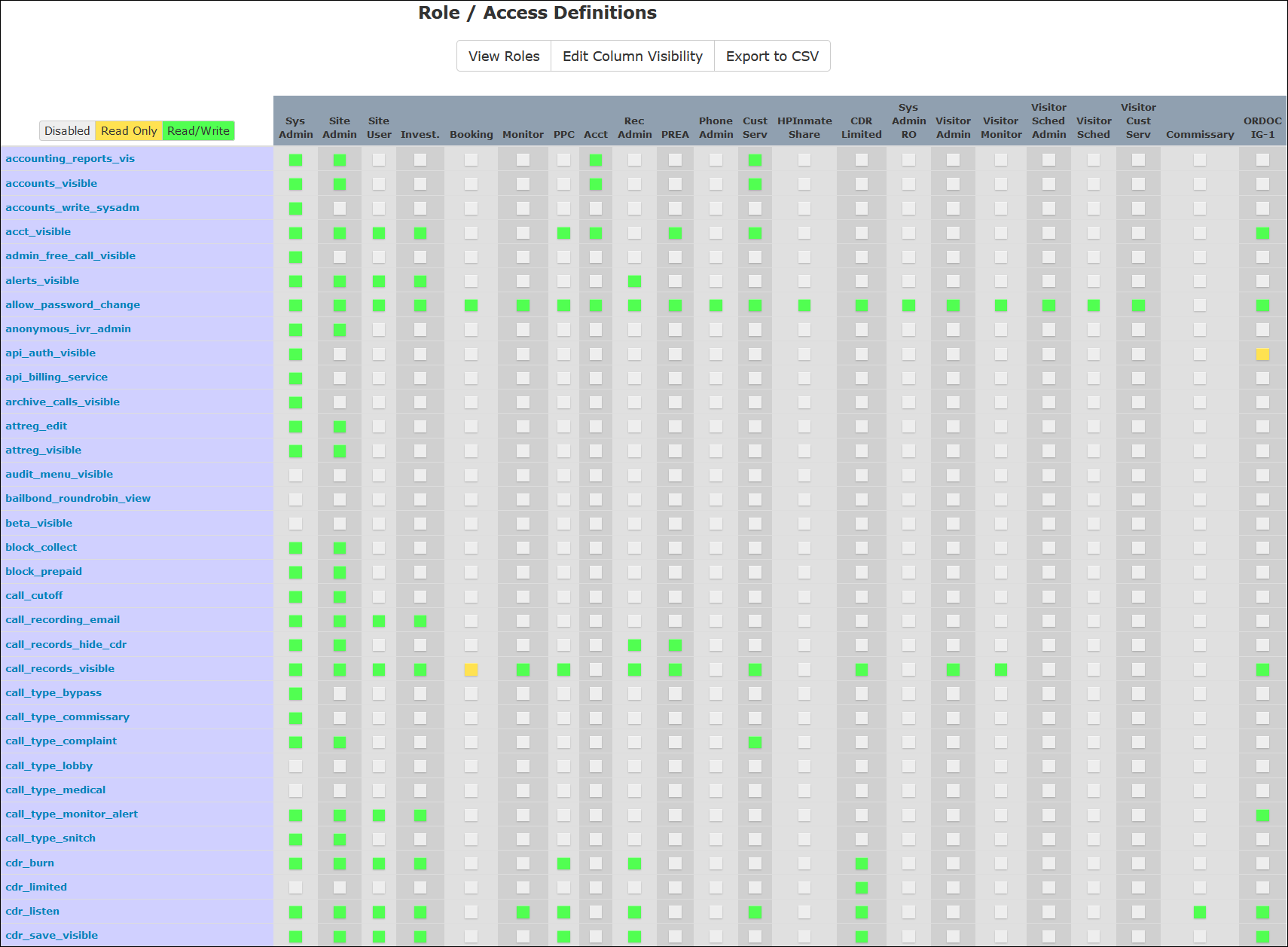
If you have a higher-level permission set granted through the access codes associated with your role, your role may be referred to as a Site Administrator or Site Admin. With this permission set, you can view or edit all functions grouped under The Site Admin tab. Two functions (Users and Roles) pertain to setting up all users and associated read-only or read/write permissions for ENFORCER® functions. For more information, see Chapter 10: Site Administration of the ENFORCER® User Reference.
Site Administration documentation will be coming soon to this wiki!
Click here to return to the top of the page.